Simon Willison builds a blog feature by voice with Codex and GPT-6 Astra
In a blog post, Simon Willison describes using the voice conversation mode in the Codex tab of the ChatGPT desktop app, running against a local dev environment, to add a Newsletters index page to his blog. He says roughly half an hour of voice conversation while cooking produced a Django model and migration, views, templates and four import scripts from the model GPT-6 Astra High; he then switched to typing to rework one import to use an API and landed the PR. He concludes voice plus live visual preview is great for multi-tasking but not yet a daily driver for detailed work.
Why it matters: It is a first-hand account of how far voice-driven coding agents work in practice: coarse scaffolding by talking, fine detail still by keyboard.
9th October 2026
I shipped a new feature for my blog today: the Newsletters page, which offers an index of all of the newsletters I’ve sent out, both my free weekly Substack and my monthly sponsors-only updates. I built the feature almost entirely using my voice, chatting away to my laptop while I cooked dinner.
Codex voice mode
I used the ChatGPT desktop app for this, in the Codex tab, using the voice conversation mode, running against a local development environment. Here’s what that looks like:
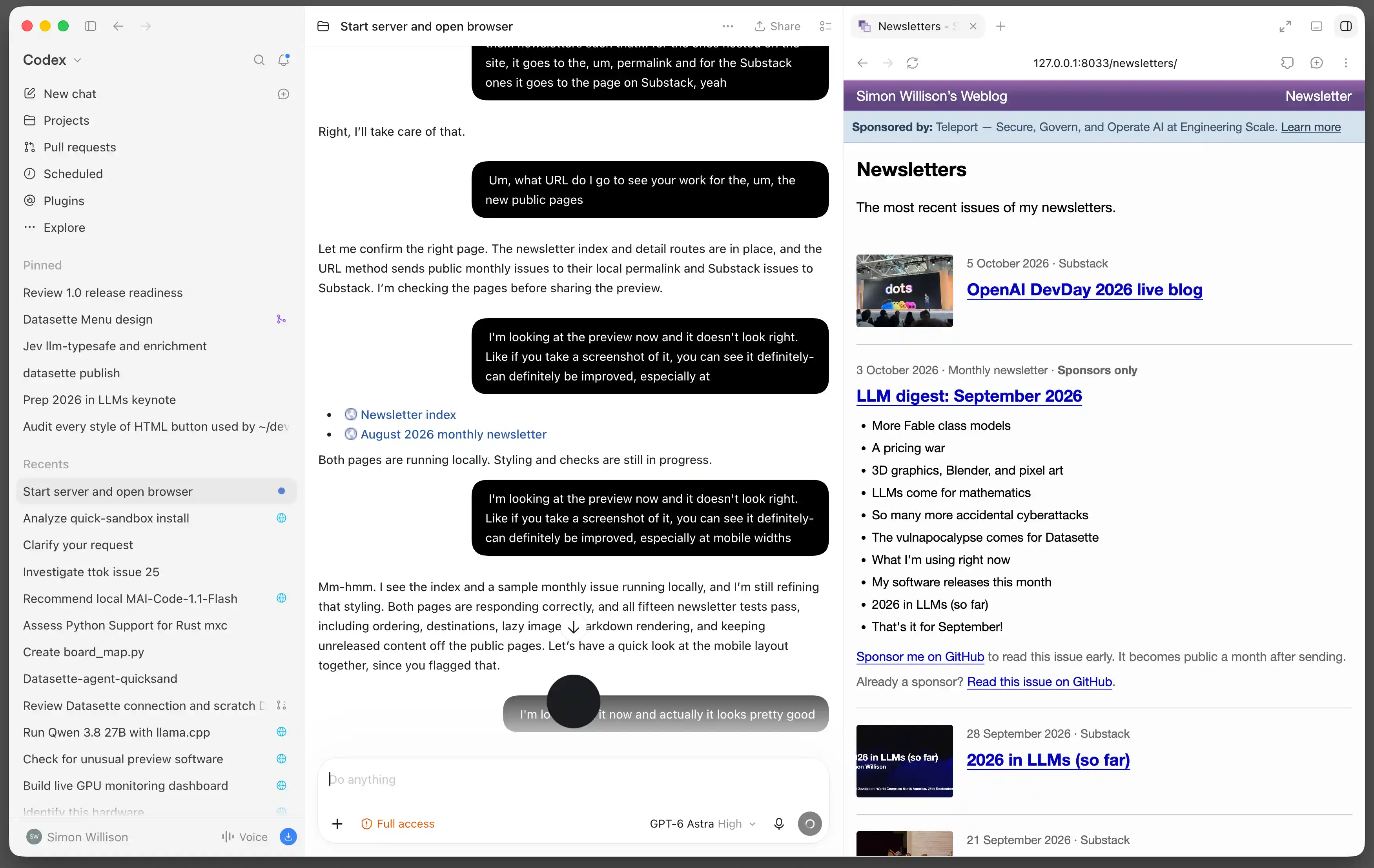
I started the session against my local simonwillisonblog checkout by typing:
Start dev server and open in browser
This gave me a preview of the site that it would be working on, and meant that I could later ask it to show me the new pages so I could visually track its progress.
Then I clicked the “Start new voice chat” button—that’s not the microphone button, it’s the one to the right of it—and set my laptop up in the kitchen so I could talk to it while I cooked.
Talking to my computer
I had a pretty good idea of what I wanted to build, and it’s a simple enough Django feature that I was certain the model (in this case GPT-6 Astra High) would be able to do it. A new model, a migration, some view code, templates, and a couple of import functions to populate the database from external sources.
Here’s an extract of my voice transcript that was captured by Codex:
Um, they do not. Um, this is going to be a new type of content. Um, it’s not going to show up... Oh, hold on. Yeah, no- I do not want this to show up in my, um, tag pages and date archive pages and... Actually, no, I think... I don’t want it on the tag pages. I don’t want it on the, um, blog index page. But I think I do want it to show up on the date-based pages. You know, if you navigate to September the 19th, and I sent a newsletter on that page, I think I want that to show up. So... this is- so I think we probably need a new model. The other thing is that I want them searchable, uh the Substack ones are not searchable, because those are actually just copies of other s- on content on my blog. These monthly ones do contain unique content, and spe- and once they’re... published, like once they’re made public a month after they’ve gone out, I want them to show up on my search results.
Apparently this was clear enough that the model knew what I wanted to build! You can read the full transcript, disfluencies and all, in this Gist.
We went on like this for about half an hour (the time it took to cook dinner). The model would reply and occasionally ask clarifying questions, then get to work modifying the code.
What we built
We got a surprisingly long way entirely by voice:
A new model and migration to represent imported newsletters in Django, plus Django Admin configuration for that
Four working imports:
- The most recent Substack items via RSS
- Every other Substack item via their undocumented API, which GPT-6 Astra knew about (it tried
/api/v1/archivedirectly) and then ran a search to figure out how to paginate it and found this article by Karen Spinner - All of my published monthly newsletters from my simonw/monthly-newsletter-archive GitHub repository
- My most recent private sponsors-only newsletter from a private repository
The /newsletters/ and /newsletters/2026/ public archive pages
Newsletters showing up on day and month archive pages too, but not on tag pages or my homepage
Weekly Substack newsletters link to Substack; archived monthly newsletters have their own pages
Integration with my site search engine
It was almost ready to ship. The catch was the imports: Astra offered to export data from my local copy so I could import that into production, but I wanted it to work like my other import scripts. Since some of the data lived in a private GitHub repository, this would involve creating a new API key, and for that I knew I’d have to sit at the keyboard for a while.
Finishing it with a review
Once I had finished cooking and judged it mostly feature-complete, I had Codex create a branch and open a pull request.
I reviewed the code in the GitHub PR interface. It was nearly what I needed, except it had chosen to use Git in a subprocess for one of the import scripts. I needed one of the imports to pull from a private Git repository, so I figured the API would be a better bet. I switched to typing and had Codex swap that out for an API-based import instead.
You can see the changes I made during the review in the extra commits on the PR. I fixed the import mechanism and made a few tweaks to the display of those public pages. It took an additional half hour of typing-based prompting to get to the point where I was happy to deploy it to production by landing the PR.
The end result
You can see the end result at the new newsletters index page, or view the page for a previous monthly newsletter.
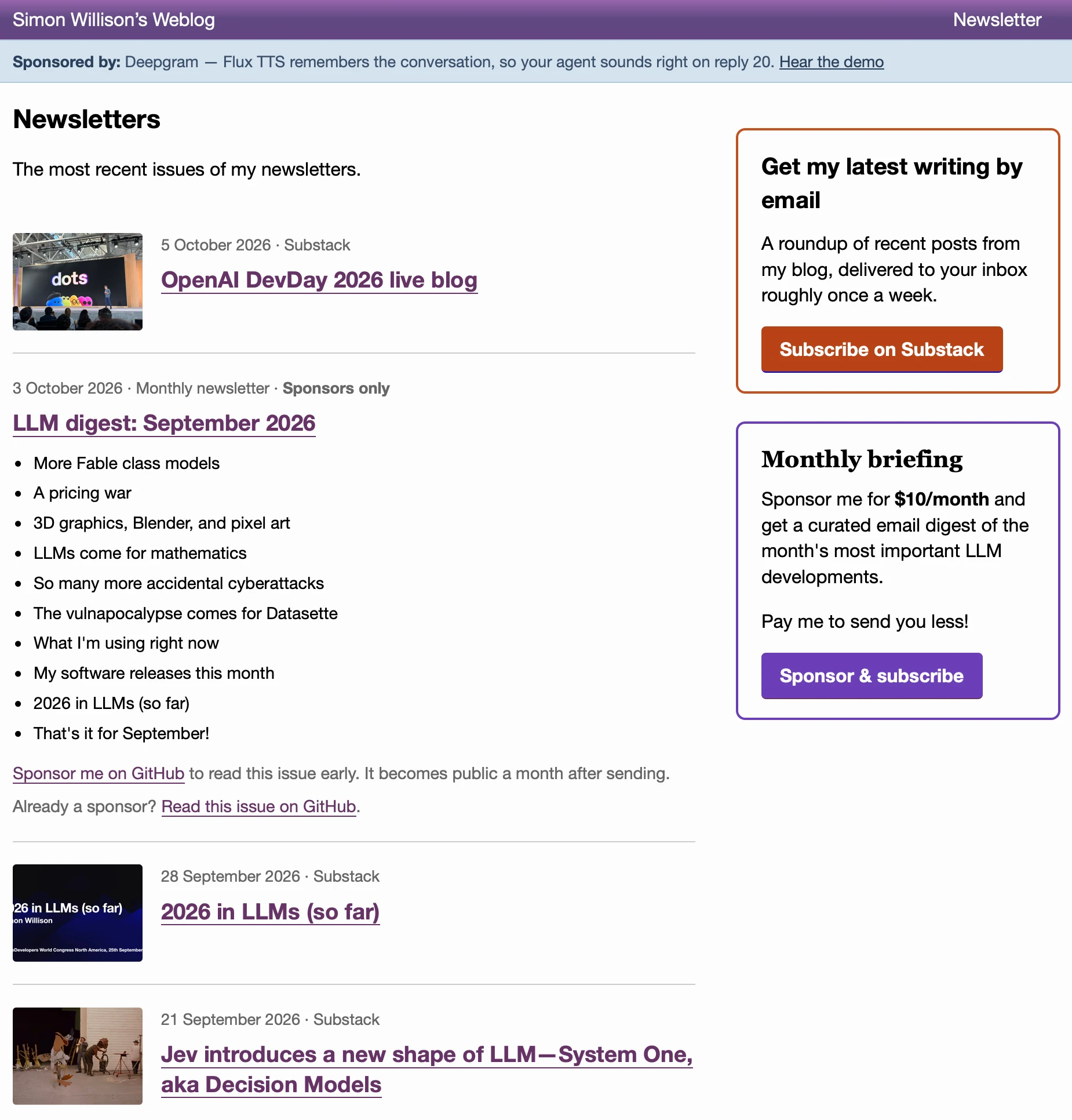
The index page shows my most recent Substack weekly newsletters and GitHub sponsors monthly newsletters mixed together in reverse chronological order. Further down the page are links to my by-year archive pages.
GPT-6 Astra designed the page, and then tweaked that design based on my vocal feedback from glancing at the local preview across the kitchen.
Better for multi-tasking than as a daily driver
OpenAI love using voice-driven demos like this one for things like DevDay—and they do work well in that environment. I don’t think this is going to be a daily driver for me though.
I’ve written before about how much “work” I get done using ChatGPT voice mode on my phone while walking the dog—mostly research and brainstorming, but occasionally actual development work by having ChatGPT write and test out snippets of code.
This feels different. The addition of the visual preview, plus being able to type or paste things in via the keyboard when I need to communicate something that doesn’t work vocally, makes this a much more powerful way of interacting with a coding agent.
I still switch back to typing once I get down to the details of things though. Being able to paste in examples and error messages, or directly highlight the code or feature that needs changing, remains more efficient than trying to describe it in words.
I mainly work from home, which is good because there’s no way I’d want to talk to my computer like this in a shared workspace!
The killer feature for me is the ability to multi-task. I usually cook with a podcast or TikTok running; now I can actually build stuff instead.
How we got here
- Building AI While Digging Bunkers: What Silicon Valley Elites Fear36氪 人工智能 · OpenAI
- OpenAI's $70B vs $50B ARR gap is mostly a measurement issue36氪 人工智能 · OpenAI
- EU's ENISA and Joint Research Centre begin testing Chinese open-weight AI modelsThe Next Web · OpenAI
- Personal agent race: Meta Muse, Manus Cue and OpenAI Dots36氪 人工智能 · OpenAI
- Trump awards top US science honors to Musk, Huang, Su and Brin36氪 人工智能 · OpenAI
- OpenAI revenue scare draws investor attentionCNBC Technology · OpenAI