
EmbeddingGemma 2 发布:端侧多模态嵌入模型
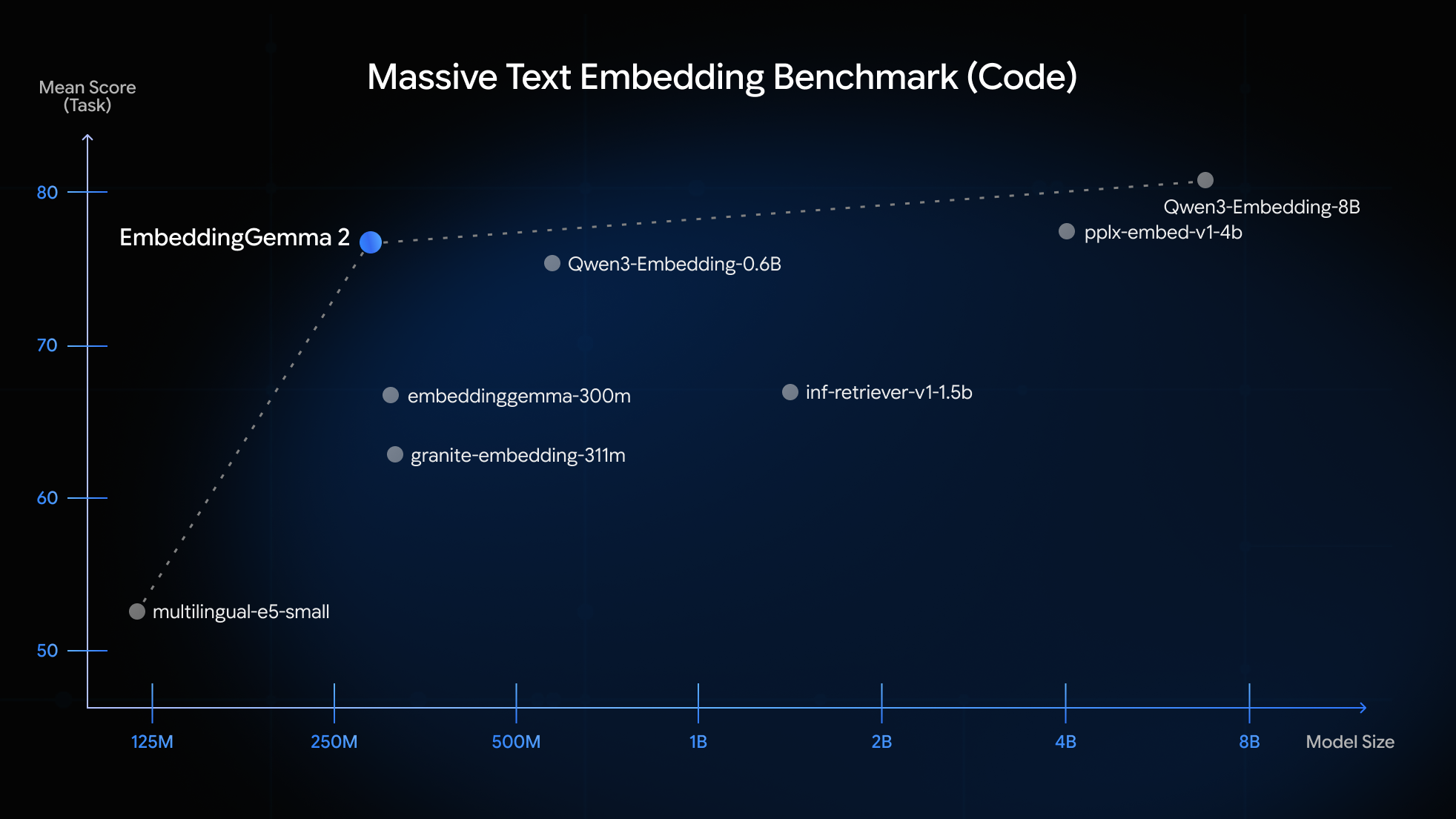
Google 于 10 月 6 日发布 EmbeddingGemma 2:一个基于 Gemma 4 架构、采用 Apache 2.0 许可的 7.4 亿参数开放模型,可把文本、代码、图像、视频与音频映射到统一的 768 维向量空间。模型采用模块化设计,纯文本/代码仅需 270M 参数,加视觉为 440M、加音频为 570M、全模态为 740M,并可用 MRL 把向量从 768 维截断至 512/256/128 维,最多节省约 6 倍存储。Google 称其在 MTEB (Code) 上比前代提升约 14%(78.68 对 68.76),并宣称优于部分参数量为其两倍的模型;量化后在 Pixel 11 Pro 上纯文本约占用 191MB 内存,完整多模态约 567MB。Google 同时用实验性 Mac 应用 AI Edge Foresight 展示离线会议速记扩写与本地知识库检索。
为什么重要:可离线运行的多模态嵌入模型降低了本地 RAG 与隐私优先检索的门槛,但性能对比目前仍是 Google 自报数据。
相关来源 9to5Google · Google DeepMind Blog · Google Developers Blog · SiliconANGLE AI · The Decoder · r/LocalLLaMA · 科技新报
OCT. 6, 2026
Modern search and retrieval augmented generation (RAG) applications increasingly need to work across diverse content types, from technical documentation and source code to images, video clips, and audio recordings. The challenge is finding models that deliver strong retrieval accuracy while maintaining low latency across all these formats without requiring massive compute infrastructure to run and index.
EmbeddingGemma 2 is designed to provide a single, compact open model released under the Apache 2.0 license, delivering exceptional multimodal performance for its size. Based on Gemma 4, this sub-1B model maps text, code, images, video, and audio into a unified 768-dimensional space. Its modular architecture lets you load only what you need, scaling from 270M parameters for text and code up to 740M parameters for all modalities.
Key capabilities include:
- Native multimodal retrieval: Unlocks search across text, code, images, video, and audio directly in a shared 768-dimensional vector space.
- Superior code understanding: Significantly outperforms EmbeddingGemma 1 on code search and technical retrieval, making it ideal for local codebase indexing and agentic code search.
- Modular memory footprint: Selectively load only the encoders you need at runtime: 270M (text/code), 440M (text + vision), 570M (text + audio), or 740M (full multimodal), all projecting into the same compatible vector space.
- Flexible vector storage: Matryoshka Representation Learning (MRL) enables dynamic truncation from 768 dimensions down to 128 dimensions, cutting vector database storage requirements while retaining much of the original quality. For instance, at 256 dimensions, most of the full quality of the original embedding on text and code is retained and about 95% on image, video, and speech retrieval
How it works under the hood
EmbeddingGemma 2 replaces chained models with modular encoders that project into a shared 768-dimensional space:
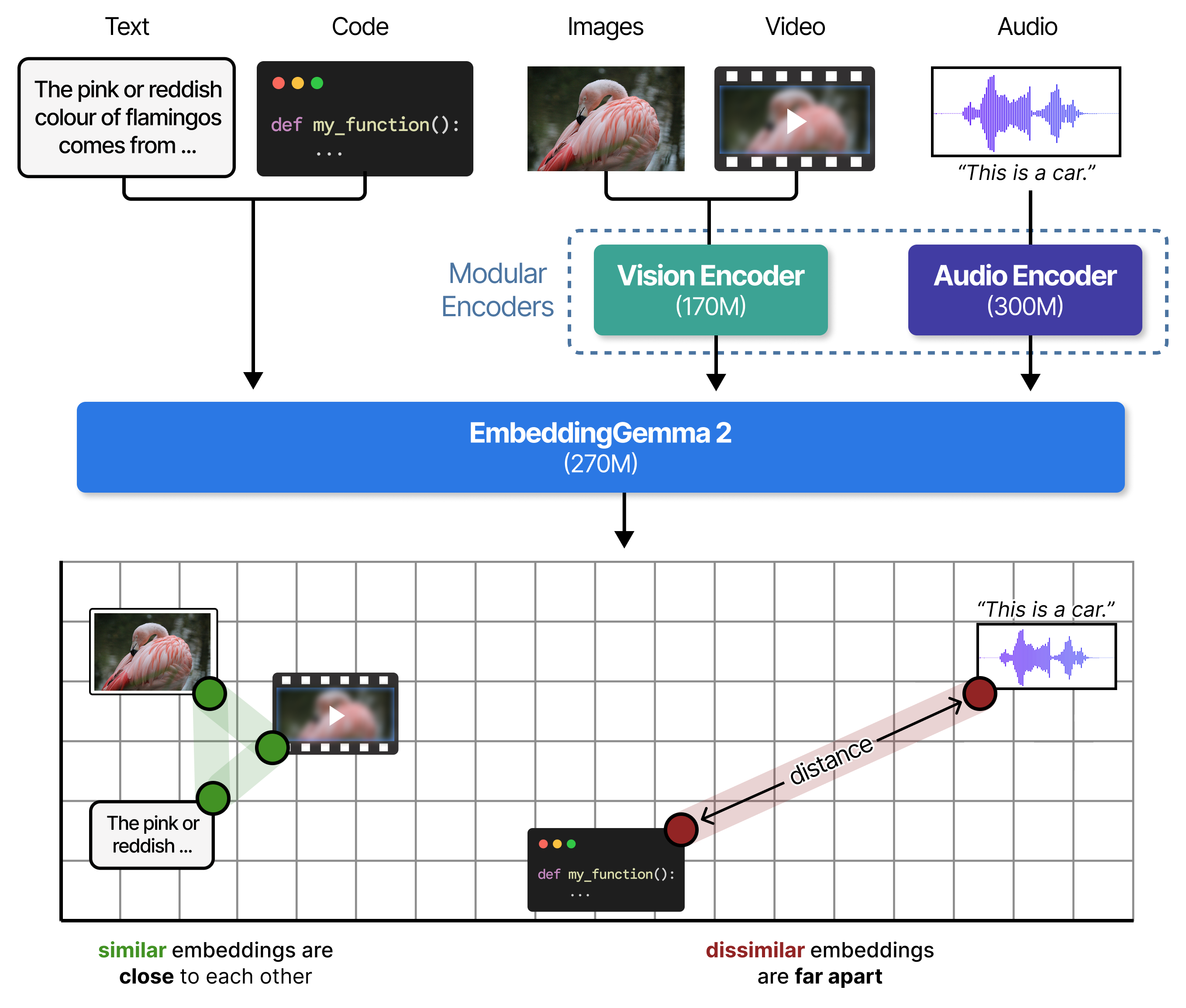
Even though each modality is processed by a specialized encoder, all inputs are processed through the shared backbone and their resulting embeddings occupy the same dimensional space:
- Text and code (270M base): An adapted Gemma 4 decoder with an 8,192-token context window.
- Vision (+170M): A vision encoder that processes images, visual documents (PDFs, slides, charts), and video frames.
- Audio (+300M): A dedicated speech and sound encoder that directly ingests raw audio.
- Modular loading: You only load what you need. Run text-only at 270M parameters, add vision for 440M parameters, or load the full multimodal model at 740M parameters.
- Shared tokenizer & audio encoder with Gemma 4: When paired with Gemma 4 in an on-device RAG pipeline, both models share the same text tokenizer and audio encoder architecture, reducing the total memory footprint.
See it in action
Video 4 We embedded the Hugging Face transformers codebase with the 270M text-only setup. Then, the embeddings are used to efficiently search through this large codebase by matching the similarity of the query with the codebase using an Agent (Gemma 4 26B A4B with the Pi agent harness) .
Developer Guide: Using EmbeddingGemma 2
You can run EmbeddingGemma 2 across text, code, images, video, and audio with the sentence-transformers library (v6.1.0 or later):
pip install -U sentence-transformers[image,audio,video] transformers
Shell
Copied
Step 1: Load the Model
The full model embeds text, code, images, video, and audio:
from sentence_transformers import SentenceTransformer

# Full model: all modalities (740M parameters)
MODEL_ID = "google/embeddinggemma-2"
model = SentenceTransformer(MODEL_ID)
Python
Copied
To minimize memory usage, you can omit unused modality encoders at load time by setting vision_config or audio_config to None in config_kwargs. Disabled encoders are never loaded into memory, so the savings apply to both the weights and peak allocation:
# Text only (270M parameters)
text_only_model = SentenceTransformer(
    MODEL_ID,
    config_kwargs={"vision_config": None, "audio_config": None},
)

# Text, images, and video (440M parameters)
text_image_model = SentenceTransformer(
    MODEL_ID,
    config_kwargs={"audio_config": None},
)

# Text and audio (570M parameters)
text_audio_model = SentenceTransformer(
    MODEL_ID,
    config_kwargs={"vision_config": None},
)
Python
Copied
Step 2: Embed Text and Code with Task Prompts
EmbeddingGemma 2 is trained with short task instructions to steer representations for specific tasks. Set prompt_name in encode() to add it for you:
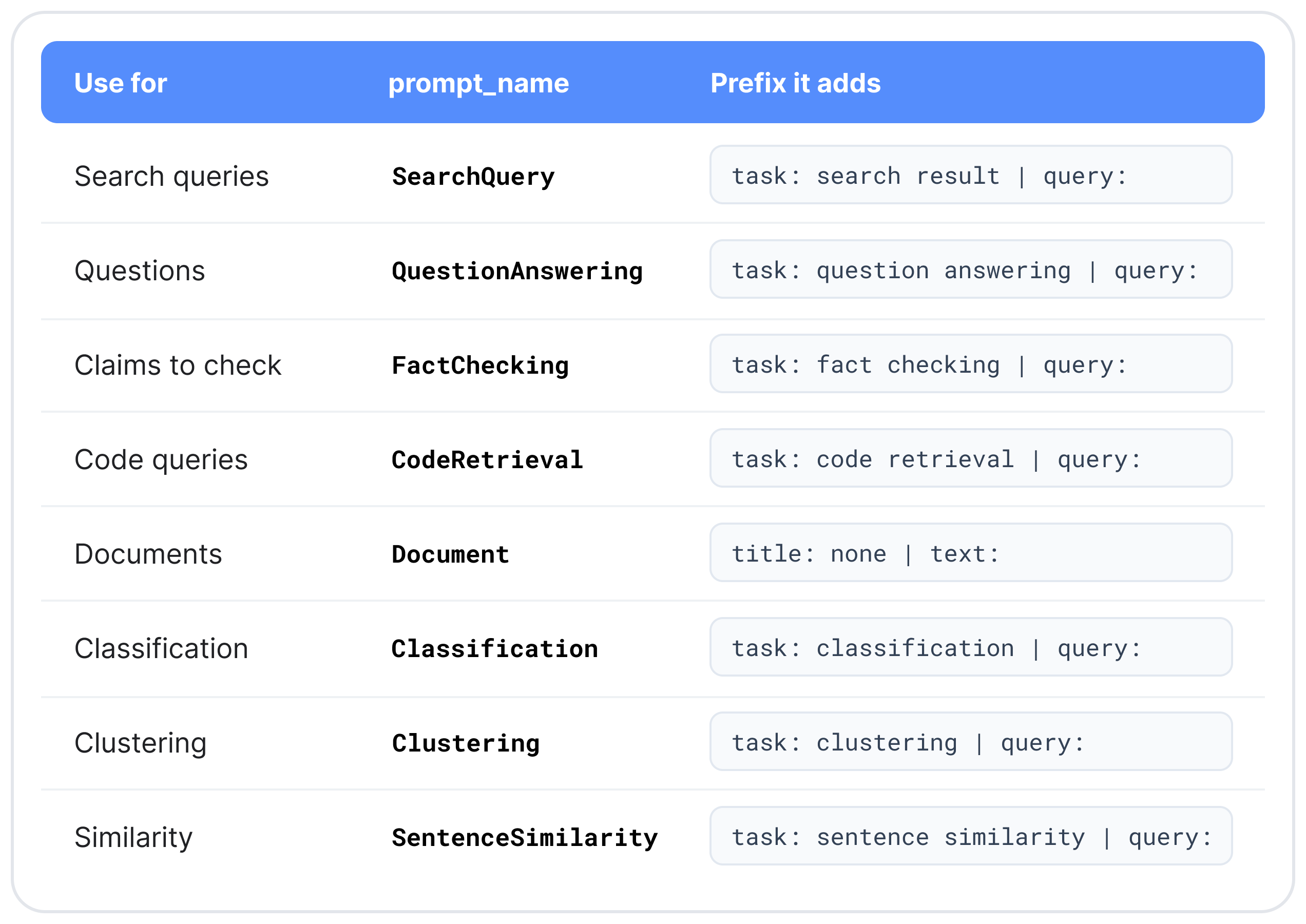
For retrieval, encode queries and documents with different prompts:
query = "What causes the northern lights?"
document = "The northern lights are caused by charged particles from the sun.." # truncated

# Embed using `prompt_name`
query_emb = model.encode(query, prompt_name="SearchQuery")
doc_emb = model.encode(document, prompt_name="Document")

print(model.similarity(query_emb, doc_emb))
Python
Copied
Step 3: Embed Images, Video, Audio, and Interleaved Inputs
Pass media as a dictionary keyed by modality without a prompt. To embed text and media together, mark where each item goes with <|image|>, <|video|>, or <|audio|>:
# Cross-modal search: one text query against a photo and a sound recording
image_emb = model.encode({"image": "sunset_beach.jpg"})
audio_emb = model.encode({"audio": "ocean_waves.wav"})
query_emb = model.encode("ocean waves at sunset", prompt_name="SearchQuery")

print(model.similarity(query_emb, image_emb))
print(model.similarity(query_emb, audio_emb))

# Interleaved: one embedding for a product listing with text, photo, and video
listing_emb = model.encode({
    "text": "Waterproof trail shoe. <|image|> Grip test on wet rock: <|video|>",
    "image": "trail_shoe.jpg",
    "video": "grip_test.mp4",
})
query_emb = model.encode("waterproof trail shoes", prompt_name="SearchQuery")

print(model.similarity(query_emb, listing_emb))
Python
Copied
Despite coming from different modalities, the embeddings generated by EmbeddingGemma 2 occupy the same dimensional space and can be compared on their semantic similarity.
Step 4: Truncate Dimensions with Matryoshka (MRL)
Pass truncate_dim (512, 256, or 128) with normalize_embeddings=True to get shorter, unit-length vectors. Queries and documents must use the same dimension:
# Truncate the query
query_emb = model.encode(
    query,
    prompt_name="SearchQuery",
    truncate_dim=256,
    normalize_embeddings=True,
)
Python
Copied
To use one dimension for every call, set it at load time instead: SentenceTransformer(MODEL_ID, truncate_dim=256). For instance, in bfloat16 precision, storing a million 768-dimensional vectors takes roughly 1.5 GB of memory, while truncating them to 128 dimensions requires just 250 MB. That 6x reduction allows you to store six times as many embeddings in the same memory budget, making it much easier to fit large indexes in memory or on-device.
Choosing Your Configuration
In sentence-transformers, all four encoder setups load from the same checkpoint, so they share one vector space: a query embedded with the 270M text-only setup can be matched directly against documents embedded with the full model.
As a general guideline, load only the encoders your data needs, and truncate dimensions only when storage or search speed require it.
Which Encoders to Load
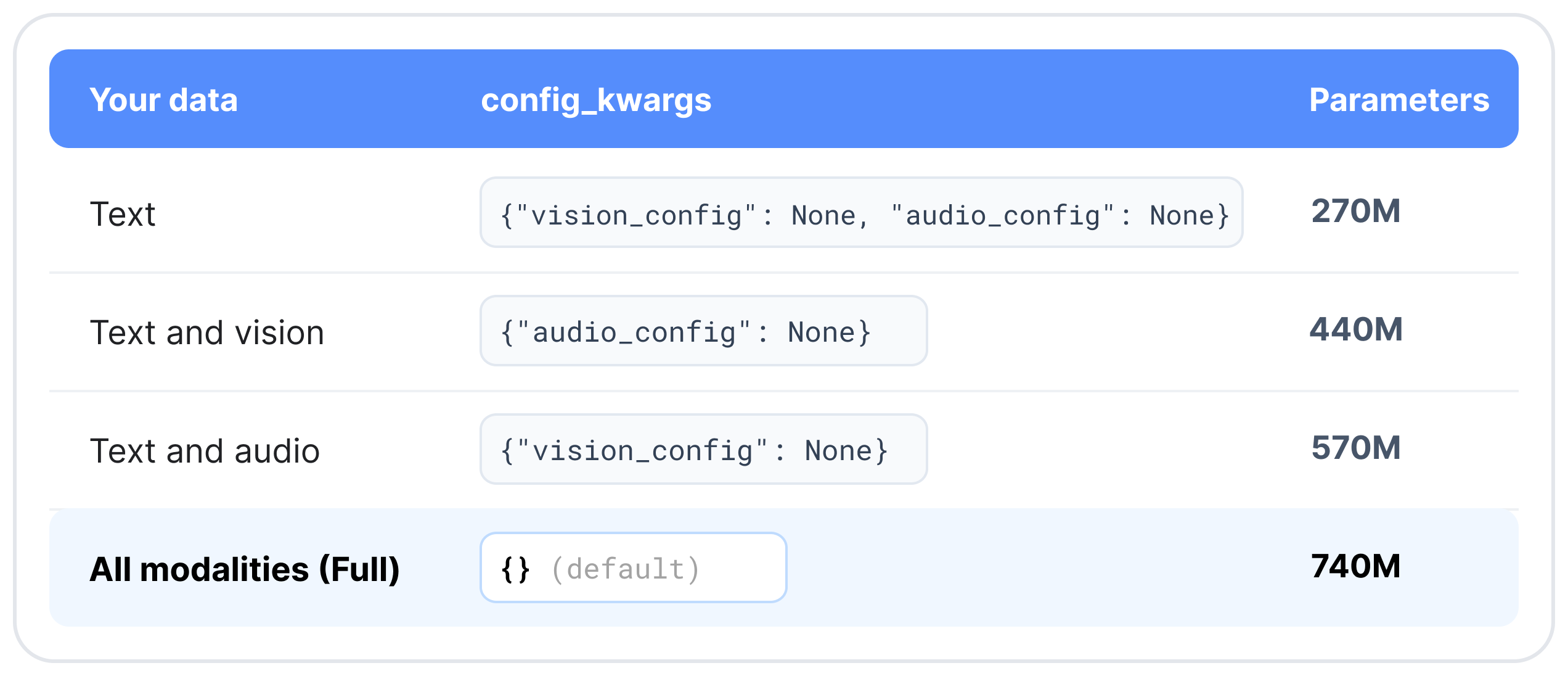
If you start with a text-only index and later add image or audio embeddings, simply reload the model with the additional encoder enabled. Embeddings you have already computed do not need to be re-computed.
Which Dimension to Use
- 768d or 512d: Multimodal and visual document retrieval, or whenever recall matters more than storage.
- 256d (3x storage reduction): Storage-constrained indexes. Keeps most of the full quality of the original embedding on text and code and about 95% on image, video, and speech retrieval, at a third of the storage.
- 128d (6x storage reduction): Large text-only indexes and first-stage shortlisting (shortlisting before re-ranking). Text and code retains around 90% quality, but image, video, and speech retrieval quality drop to around 75%. Validate on your target data before deploying 128d for multimodal queries..
How Much Fits in One Input
All modalities share the 8,192-token context window, at fixed rates:
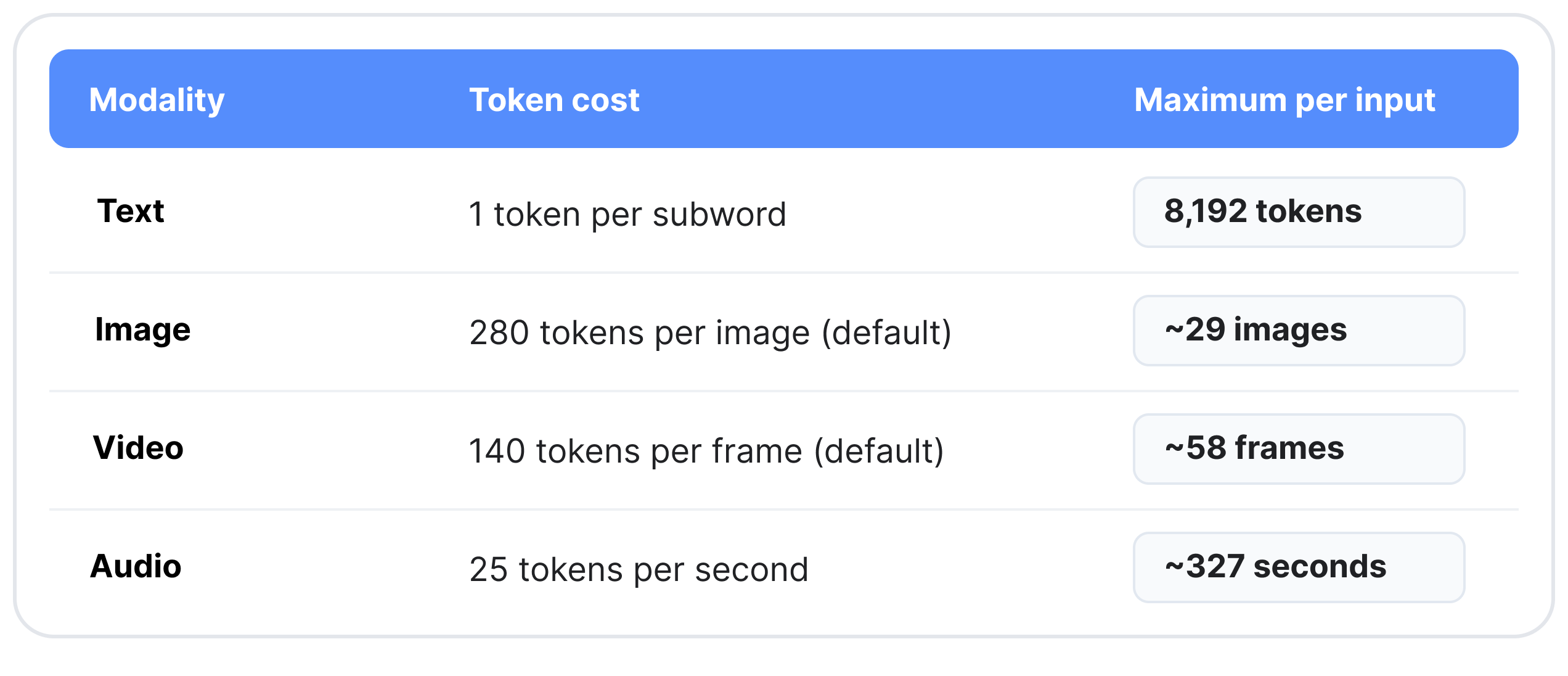
The maximums assume a single modality with no text. Pass media as file paths (MP4 for video), URLs (images and audio), or in-memory PIL images, arrays, and tensors. Video is sampled at 1 frame per second by default, and audio should be 16 kHz mono.
Benchmarks & Evaluation
EmbeddingGemma 2 scores 14% higher than EmbeddingGemma 1 on MTEB (Code), adds image, video, and audio retrieval while retaining the accuracy on multilingual text of EmbeddingGemma 1
Getting Started Today
Ready to explore multimodal embeddings? Take a look at the following resources to find out more:
- Download the Weights: Access the weights of the model (released under the Apache 2.0 license) directly on Hugging Face.
- Integrate & Learn: Read more about EmbeddingGemma 2 in the Gemma documentation.
- Use Your Favorite Development Tools: Run the model efficiently using vLLM, Hugging Face Transformers, sentence-transformers, SGLang, MLX, Ollama, LMStudio, and LiteRT.
- Adapt & Fine-Tune: For rapid experimentation, you can explore efficient fine-tuning with Unsloth.
- Explore Search: Try the Instant Media Search and Video Moments Finder on-device demos in the Google AI Edge Gallery.
Next
前因后果
- Ghost AI 获 1100 万美元融资,打造智能体电脑SiliconANGLE AI · Hugging Face
- OpenAI面临不断扩大的监管审查The Information · Google
- GLM 5.3 上线 Amazon BedrockAWS Machine Learning Blog · Hugging Face
- Gemini或将代打私人电话The Verge AI · Google
- MCP信任缺口可传播恶意指令Ars Technica AI · Google
- Google暂停开源漏洞奖励计划TechSpot · Google