BMAD-METHOD:开源 AI 驱动开发方法登上 GitHub 趋势榜
BMAD-METHOD(Breakthrough Method for Agile AI Driven Development)是一个免费、MIT 许可的开源敏捷开发方法,用于在 AI 编码工具中把想法或变更请求变成可交付的软件。它可通过 Skills CLI(npx skills add)、Claude Code 插件市场和 Codex 插件市场安装,要求所用 AI 编码工具支持 skills 并具备 uv 环境,强调决策显式化、上下文可延续以及按工作量大小伸缩流程。官方还提供 BMad Builder、创意智能套件、Test Architect、BMad Loop 和 Game Dev Studio 等模块,既可全新起步,也可接入既有代码库。
为什么重要:它反映了开发者正在为 AI 编码智能体补上流程与上下文管理这一层,而不仅是提示词技巧。
Breakthrough Method for Agile Ai Driven Development

Agile Ai Driven Development — turn an idea or change request into working software without giving up the thinking.
Ai Driven Development (AiDD) covers the whole effort, not only the code: what to build, how it holds together, and how it changes as you learn. BMad Method is the agile way to do it — decisions stay explicit, context carries forward, and the process sizes itself to the work. Small changes go straight to build. Complex work gets the depth it needs. The same method covers a weekend prototype and a system with years of history behind it.
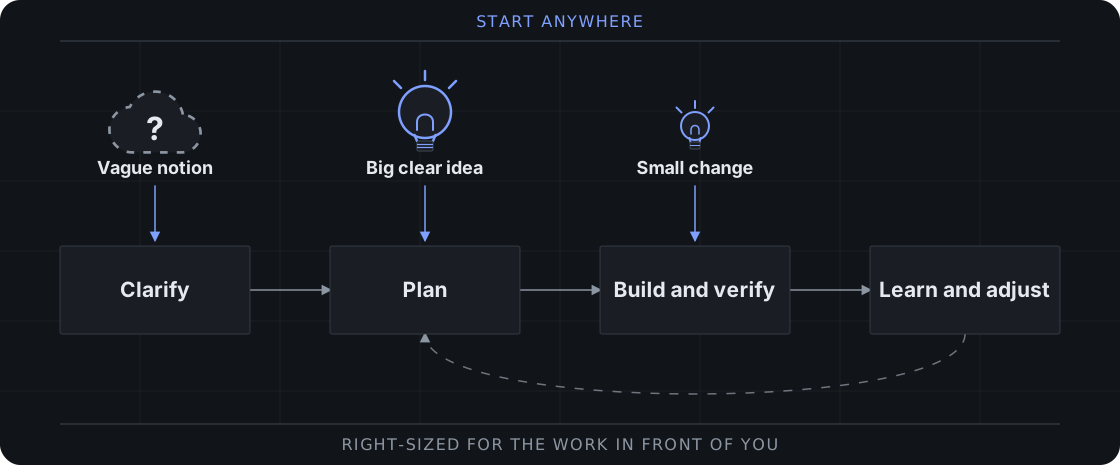
Start anywhere. Use BMad end to end, or carry its briefs, specifications, and architecture into your existing delivery workflow.
Start Building
Choose one install route. You need an AI coding tool that supports skills and uv for BMad setup and Python scripts.
Skills CLI — with Node.js and npm and Git, run in your project:
npx skills add bmad-code-org/BMAD-METHOD
Select the skills and coding tool you want. Include bmad for setup and help, and the module record for each module you pick skills from: bmod-method and bmod-core-tools. To install by name instead, list them together: npx skills add bmad-code-org/BMAD-METHOD --skill bmad --skill bmod-core-tools --skill bmod-method --skill bmad-build.
Claude Code plugin — add the marketplace inside Claude Code:
/plugin marketplace add bmad-code-org/bmad-plugins
Codex plugin — add the marketplace from your terminal:
codex plugin marketplace add bmad-code-org/bmad-plugins
For either marketplace, install bmad-method for the delivery workflows and bmad-core-tools for standalone skills, including the bmad hub.
Open your coding tool in the project and ask the bmad skill to run bmad setup. Then invoke bmad-build with what you want to change. Ask bmad whenever you want guidance on what comes next or what is optional.
Build your first project with BMad →
Add BMad to an existing codebase →
BMad is free and open source, with no paywalled workflows or gated community. Ask for bmad status to check versions and see what to run next. Ask for bmad setup to install updates: it runs npx skills update, then refreshes the project and cleans up renamed and removed skills. With a plugin marketplace, update there, then ask for bmad setup.
Why BMad?
Coding assistants are effective at implementation, but they often turn unstated assumptions into code. BMad keeps you in control while its agents and workflows make the important decisions explicit and preserve them as context for the work that follows.
- Right-sized process — Go directly to implementation for clear changes or add deeper planning for larger initiatives.
- New or existing code — Start from nothing, or establish verified context on a codebase you inherited and work from what is actually there.
- Durable context — Carry product and technical decisions forward instead of re-explaining them in every chat.
- Specialized perspectives — Bring in product, architecture, UX, development, and testing expertise when it helps.
- Guided collaboration — Use structured workflows and multiple-agent discussions without handing over judgment.
- One delivery path — Move from early thinking through reviewed implementation, correction, and learning.
See how much planning a change needs →
BMad Ecosystem
Install the core method or add official modules for specialized work.
| Module | Purpose |
|---|---|
| BMad Method | Plan and deliver software, from new prototypes to established codebases |
| BMad Builder | Skill, workflow, and agent builder |
| BMad Creative Intelligence Suite | Creative thinking partners for innovation, design thinking, and storytelling |
| BMad Test Architect | Enterprise testing add-on for BMad Method |
| BMad Loop | Builds, verifies, and retros a whole epic unattended |
| BMad Game Dev Studio | Ideate, design, and build games in any framework, including Unity, Unreal, Godot, and Phaser |
Documentation
- Build Your First Change — Install BMad and build a small project.
- Choose a Planning Path — Pick how much planning a change needs and see what each planning skill produces.
- Start in an Existing Codebase — Add BMad to an existing codebase.
Community
- Discord — Get help, share ideas, and collaborate.
- YouTube — Watch tutorials and master classes.
- GitHub Issues — Report bugs and request features.
- GitHub Discussions — Join longer community conversations.
- BMad Code — Explore the wider ecosystem.
Support and Contributing
BMad is free for everyone and always will be. Star the repository, buy me a coffee, or email [email protected] for corporate sponsorship.
Contributions are welcome. Read CONTRIBUTING.md before opening a pull request.
License
MIT License — see LICENSE for details.
BMad and BMAD-METHOD are trademarks of BMad Code, LLC. See TRADEMARK.md for details.
If you would like to contribute, join us in the discord and read CONTRIBUTORS.md first.
前因后果
- Windows-MCP:操控 Windows 的开源工具GitHub Trending · Python · Claude Code
- 谷歌押注RSI:Gemini 4 Argon与自改进36氪 人工智能 · Claude Code
- OpenAI DevDay:Dots 把持续工作交给云端助手少数派 AI · Codex
- Claude Code 新增自动评测与爬坡调优36氪 人工智能 · Claude Code
- Anthropic向15个以上美国联邦机构开放Claude36氪快讯 · Claude Code
- OpenAI 受 Jev 启发,一周做出决策 API36氪 人工智能 · Codex